

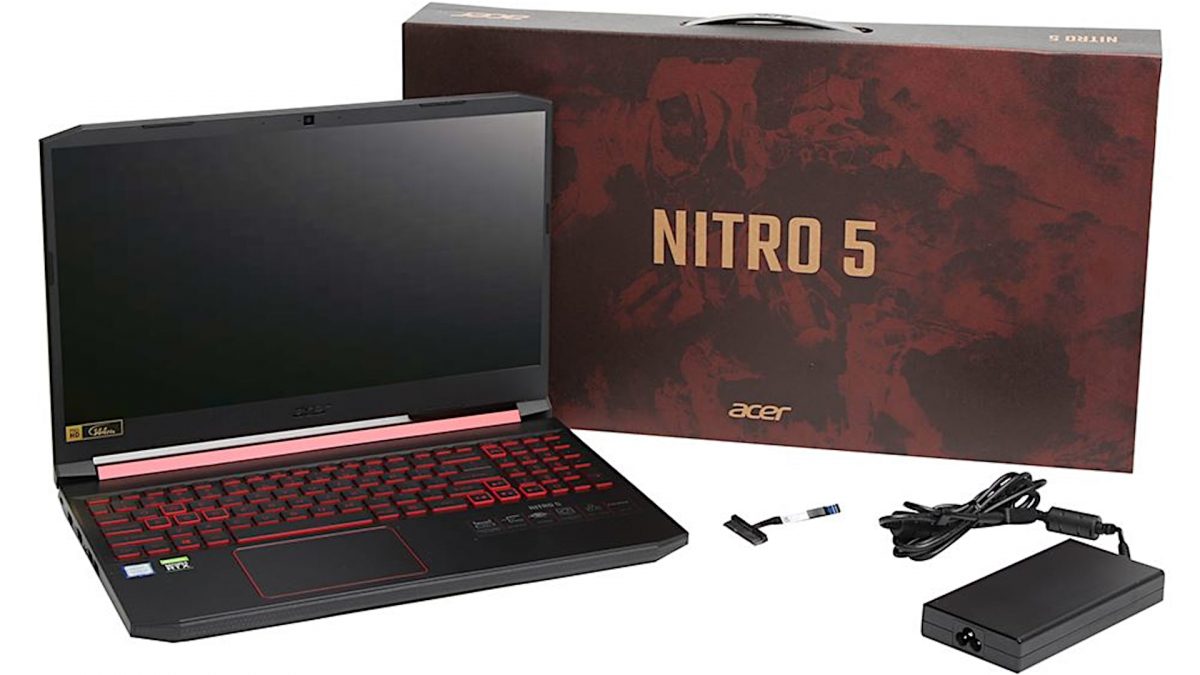
This review covers the Acer Nitro 5, a 15.6-inch gaming laptop built with an all-plastic chassis. It features an Intel Core i5 8300H processor paired with an Nvidia GTX 1050 Ti graphics card. Storage comes in the form of an Intel NVMe SSD from the 600P series, delivering read speeds around 1500 MB/s and write speeds around 500 MB/s. The device includes a 48-watt-hour battery, which realistically provides only about three hours of use under typical conditions. Wireless connectivity benefits from Intel’s latest 9560 Wi Fi module, which performs exceptionally well. Overall, the laptop offers strong value at a medium price point for gaming machines.
It stands as a solid competitor against models like the Lenovo Y530 and Dell G3. In terms of bang for the buck, the Acer Nitro 5 edges ahead slightly thanks to its balanced feature set and performance capabilities.
Design and Build Quality
The exterior presents an aluminum-style lid that looks decent with a subtle shine. However, it attracts fingerprints easily, so regular cleaning is recommended. The overall plastic construction feels sturdy for the price category and maintains a practical gaming aesthetic that is noticeable but not overly flashy.
Ports and Connectivity
On the left side, users find an Ethernet LAN port, USB Type-C, HDMI output, a standard USB port, a card reader, and a Kensington lock slot. Note that the card reader protrudes significantly when a memory card is inserted, so it is wise to remove cards before packing the laptop into tight spaces.
The right side houses a combined headphone and microphone jack, two additional USB ports, and the barrel-style power connector. The included 135-watt power brick with its 90-degree plug works reliably and shows no signs of battery discharge even during extended gaming sessions.
Upgradability and Accessibility
One of the strongest aspects of this laptop is its excellent bottom panel design. Accessing components is straightforward without needing to remove the entire panel for RAM upgrades. It ships with a single 8 GB DDR4 2666 MHz module installed, leaving an empty slot ready for expansion. There is also an empty 2.5-inch drive bay available for additional storage. This layout preserves the chassis strength while making future upgrades simple and user-friendly. The rubber feet on the base provide outstanding grip on any surface, with no slipping observed during use.
Keyboard and Touchpad
Opening the lid reveals a standard red backlit keyboard. The keys offer a good travel distance of approximately 1.4 to 1.5 millimeters, requiring a moderate amount of force for actuation. This setup delivers a comfortable and responsive typing experience without hindering speed or accuracy. The Windows precision touchpad stands out as one of the smoothest and most usable found on gaming laptops priced at 800 dollars or below.
Display
The screen uses an LG panel, essentially the same 60 Hz unit found in some other models like the Helios 300. Color coverage reaches about 66 percent of sRGB. After calibration with tools like the Spyder, results are average and comparable to other panels in this price range. While the display is not exceptional, it gets the job done for gaming and everyday tasks. For those interested, upgrading to a 120 Hz panel is relatively easy and can be completed in around 10 minutes.
Performance and Thermals
Aside from the average screen, the rest of the laptop delivers impressive results. The chassis manages heat effectively, keeping the GTX 1050 Ti well within safe limits. NVIDIA rates the GPU for a maximum of 94 degrees Celsius, but real-world gaming sessions rarely pushed it beyond the low 70s even after hours of demanding titles. This thermal headroom allowed stable overclocks of 150 MHz on the core and 500 MHz on the memory without issues.
The Intel i5 8300H CPU also benefits from flexible fan profiles and cooling options. Without any optimizations, temperatures can reach the mid 90s under load. Applying an undervolt reduces this by about 10 degrees. Enabling maximum fan speed drops it another 10 degrees, and combining undervolting with repasting and full fan speed can keep the CPU around 70 degrees or below even during prolonged sessions. Fan noise peaks at around 54 decibels in the loudest scenarios but can remain much quieter in balanced modes around the mid 40s. This setup allows comfortable gaming without headphones as the speakers easily overcome the fan noise.
Battery Life
Battery performance is limited due to the 48-watt-hour capacity. Expect roughly three hours of light use, making this laptop best suited for plugged-in operation during intensive tasks.
Audio
The built-in speakers reach maximum levels around the mid 70s in decibels. They provide balanced highs, mids, and lows that are adequate for general use and can overpower fan noise. However, pushing volume too high introduces some distortion. Do not expect premium audio quality, but the sound is serviceable for a gaming laptop in this range.
Final Thoughts
The Acer Nitro 5 proves to be a fantastic value at 799 dollars or less. It offers reliable performance, thoughtful design choices, and easy maintenance without any major weaknesses. The look is recognizably gamer-oriented yet remains understated enough for broader appeal. For anyone seeking a capable mid-range gaming machine, this model deserves strong consideration. Check additional resources for detailed upgrade guides and panel replacement tutorials.